Images are comprised of many, many tiny squares. These tiny squares are called pixels, which are aligned into patterns and specific orientations.
Pixel stands for “pictured element” and it is the smallest part of an image that can be displayed and changed. These pixels are typically displayed by 0’s and 1’s.
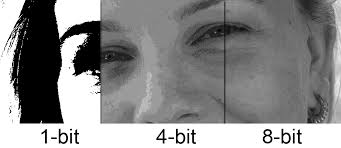
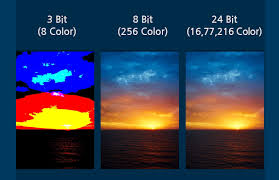
These pixels, as described above, are used in various different image formats (JPEG, GIF, TIFF, …). To better understand the how pixels work in an image, lets focus on an image in a GIF format. The quality of a GIF depends on that of the bit depth and representation. The bit depth is the number of bits used to represent the color of a single pixel. This depth can range from 1-bit, 8-bit, and higher value bit depths. To understand how many colors can be produced from each depth, think of the equation of 2^x, where x is the number of bit depth. This means that the larger the number of bit depth the better.
1-bit depth is 2 colors, 8-bit depth is 256 colors, and 24-bit depth can provide over 16 millions colors.